The Pragmatist’s Guide to Choosing a JavaScript Runtime in 2025
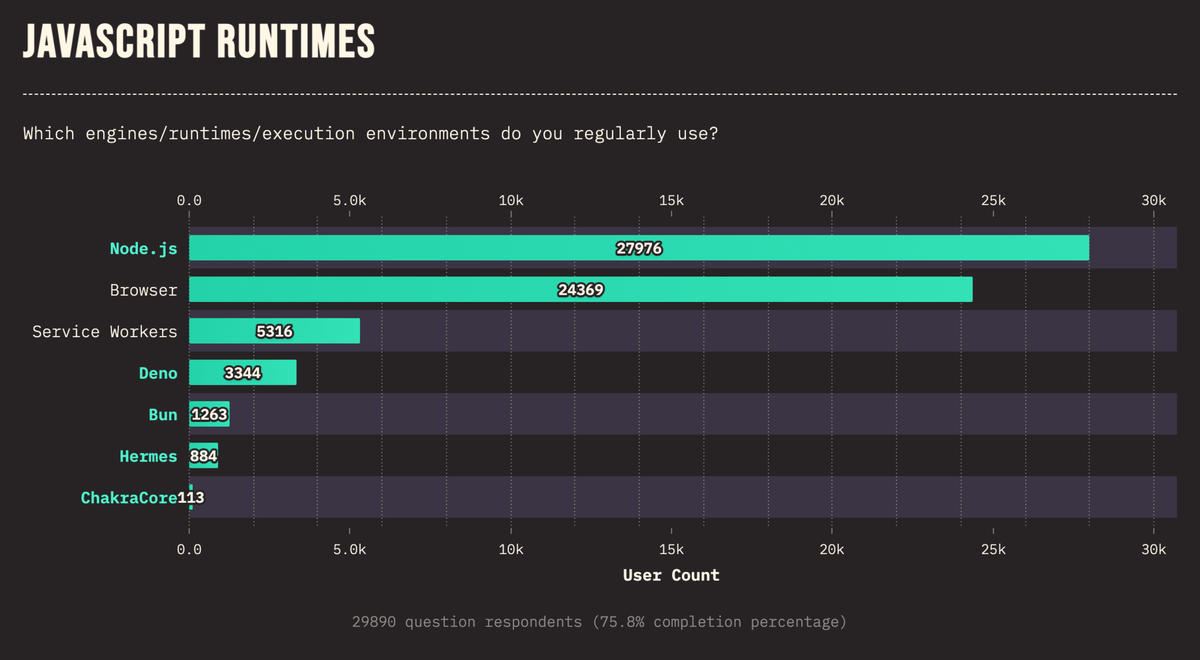
If you’ve spent even five minutes in a developer chat, you’ve seen it: the runtime debate that turns into a theology lesson. Node, Bun, and Deno aren’t just “different ways to run JavaScript”—they’re different bets about what matters most (ecosystems, speed, and safety). In 2025, the winning move isn’t picking a side. It’s choosing the runtime that lets your team ship the next feature with the least friction.
This guide is unapologetically practical: what each runtime optimizes for, when that optimization actually matters, and how to decide without getting pulled into a religious war.
Start with reality: runtime choice affects your team, not your demo⌗
A runtime is a long-term operational commitment. The demo you write today is rarely the production system you run next year.
So instead of asking, “Which runtime is best?”, ask:
- What code will you run? (Existing apps vs. new builds)
- What dependencies will you rely on? (npm vs. web APIs vs. TypeScript-first)
- How will you deploy and operate? (hosting support, CI/CD, monitoring)
- What constraints do you actually have? (security requirements, performance budgets, developer skillset)
Here’s the rule I follow: pick the runtime that reduces your total cost of change—not just the cost of initial setup.
Node.js: the ecosystem gravity well (and why enterprises keep defaulting to it)⌗
Node is the safe default because it’s the ecosystem default. If you’ve got an existing codebase, Node is the least surprising choice: most npm packages “just work,” most tutorials assume Node, and most hosting providers support it without special handling.
When Node is the right move⌗
Choose Node if one or more of these are true:
- You’re migrating or maintaining an existing application.
- You depend on mainstream npm packages (auth, payment SDKs, queues, ORMs, admin tooling).
- Your team’s hiring and training pipeline is optimized for Node.
- Your organization wants the lowest operational uncertainty.
Practical example: “we already have dependencies”⌗
Imagine a B2B dashboard that uses a mix of:
- an ORM ecosystem
- a session/auth library
- multiple UI-adjacent tooling packages
- a few legacy internal plugins
Even if Bun or Deno could run the code, you’re effectively betting on compatibility across that dependency graph. Node minimizes that bet.
The cost of Node (and how to manage it)⌗
Node’s downside isn’t “it’s slow.” It’s that performance and developer experience improvements often come as add-ons: bundlers, test runners, linters, and platform-specific optimizations. If you need speed, you’ll assemble it. That can be fine—until you have strict startup latency or serverless cold-start sensitivity.
If you’re going the Node route, treat performance as a first-class engineering task:
- use a modern bundler (so you don’t ship “everything”)
- keep your dependency graph tidy
- measure startup and request latency early, not after launch
Bun: the performance-first runtime that rewards greenfield speed⌗
Bun’s value proposition in 2025 is simple: it’s built for velocity—both developer velocity (tooling included) and runtime velocity (startup, bundling, execution).
The important nuance: Bun shines when your project is new enough that you can design around the runtime rather than dragging an old dependency ecosystem into it.
When Bun is the right move⌗
Choose Bun if:
- you’re starting a greenfield service and want to move fast
- you care about startup latency (serverless, edge-adjacent systems, ephemeral workers)
- you want an “all-in-one” dev loop (run, bundle, test—less ceremony)
- your dependencies are compatible with Bun’s world
Practical example: serverless workers and quick deploy loops⌗
Say you’re building event-driven background processing:
- short-lived compute
- frequent redeploys
- dozens of small worker processes rather than a single long-lived server
In this scenario, startup time and deployment speed become product features. Bun’s performance characteristics can turn a “wait a few seconds each redeploy” workflow into something closer to instant feedback.
The cost of Bun (and how to de-risk it)⌗
The risk is not that Bun is “bad.” The risk is that the dependency ecosystem is broader in Node. Bun can run many npm packages, but if you’re heavily invested in niche native modules or very Node-specific tooling, you may hit friction.
To de-risk:
- run a compatibility pass on your dependency tree early
- pin versions aggressively
- create a small “canary” service in Bun that covers the riskiest libraries first
Deno: secure-by-default, TypeScript-native, and web-standards oriented⌗
Deno takes a different stance: it treats security and modern API design as fundamentals, not optional upgrades. Its default model—permissioned access—forces you to be explicit about what your code can do. It’s also TypeScript-native, which means fewer translation steps between “the language we wrote” and “the language we run.”
When Deno is the right move⌗
Choose Deno if:
- your organization prioritizes security boundaries and least privilege
- TypeScript is non-negotiable (not “we’ll add types later”)
- you want to lean into web-standard APIs (instead of Node’s legacy-inherited patterns)
- you prefer runtime-level controls over relying solely on tooling and process discipline
Practical example: permissioned integrations⌗
Consider an internal automation service that:
- downloads files from a specific URL
- reads from a specific directory
- calls out to an external API
- writes logs to stdout only
In Deno, you can align runtime permissions to the exact behaviors you intend. That turns “someone accidentally added a filesystem call” into something that’s either blocked or requires conscious permission changes.
The cost of Deno (and how to manage it)⌗
The trade-off is ecosystem fit and patterns. Some Node-targeted packages and assumptions may require adaptation. If your team is deeply embedded in a Node-first workflow, switching to Deno can mean learning new patterns and dealing with compatibility edges.
To manage this:
- start with a small service that benefits from Deno’s design goals (security boundaries, TypeScript ergonomics, web APIs)
- standardize how your team structures code and permissions
- invest in internal wrappers around external services so the codebase stays consistent even when underlying libraries differ
A decision framework you can use in a meeting (without derailing into vibes)⌗
When teams get stuck, it’s usually because they’re arguing about “what’s cool” instead of “what’s required.” Use this checklist and make it concrete.
1) Legacy and dependency gravity⌗
- Mostly new code, small set of dependencies? Bun or Deno becomes viable quickly.
- Large existing npm-based system? Node is usually the path with the fewest unknowns.
2) Deployment model and performance sensitivity⌗
- Serverless / ephemeral compute / frequent cold starts? Bun often earns a spot.
- Long-lived services where latency matters but cold start isn’t brutal? Node is often fine with the right optimizations.
3) Security posture⌗
- You want least-privilege enforced at the runtime level? Deno is compelling.
- Your security model already relies heavily on infrastructure policies and process discipline? Node can still work—just be rigorous.
4) TypeScript and developer workflow⌗
- TypeScript is central to how you build and review? Deno’s TypeScript-native approach may reduce friction.
- Your toolchain is already optimized for Node+TypeScript? Node remains the pragmatic default.
5) Team and hiring reality⌗
This is the part nobody wants to say out loud, but it matters:
- If the team is Node-leaning and the org hires Node engineers, Node reduces onboarding cost.
- If your team is comfortable exploring newer runtimes and you can ramp quickly, Bun or Deno can pay off.
How to choose without making it a forever decision⌗
Even with the best framework, you’ll still want a strategy to avoid “big bang” regret.
Here’s a pragmatic approach:
- Pick the runtime for the first service, not the whole company.
- Create a compatibility spike: a small proof that runs your highest-risk dependencies.
- Measure what matters: startup time, local iteration speed, and build/test reliability—not abstract benchmarks.
- Codify your defaults: linting, formatting, testing, CI pipeline, deployment scripts.
- Leave an exit ramp: keep business logic isolated from runtime-specific quirks.
If you’re doing this well, you’re not committing to ideology—you’re building institutional muscle.
Conclusion: choose the runtime that makes shipping inevitable⌗
In 2025, the “right” JavaScript runtime isn’t the one with the loudest supporters. It’s the one that aligns with your constraints and reduces operational and developer friction.
- Choose Node for enterprise continuity and ecosystem certainty.
- Choose Bun for greenfield performance-sensitive projects where speed and tooling matter.
- Choose Deno for security-first, TypeScript-native teams that want web-standard APIs and permissioned execution.
The best decision is the one you can explain in terms of trade-offs—and implement without waiting for the internet to agree.