The State of Containers in 2023: Beyond Docker Compose
For years, “containers” quietly meant “Docker Compose plus a Dockerfile.” In 2023, that shorthand is no longer enough—and that’s a good thing. The container ecosystem has unbundled into separate components with different responsibilities, trust boundaries, and performance characteristics. If you still think of containers as one product, you’ll keep hitting ceilings. If you understand the layers, you’ll build faster, secure better, and troubleshoot like a grown-up.
Docker the company vs. Docker the runtime: two stories that don’t match⌗
Let’s start with the uncomfortable truth: “Docker” is both a company story and a runtime story, and they’re converging less than they used to. For many teams, Docker Desktop remains the smoothest path to running local containers, especially on developer laptops. Compose is still a practical way to coordinate services.
But on the backend, reality diverges:
- Some environments run workloads without a long-lived daemon.
- Kubernetes relies on a runtime layer that is not “Docker.”
- Image builds are often handled by builders that don’t care about Compose at all.
So the real question isn’t “Are containers still Docker?” The real question is: which layer are you actually using, and what assumptions did you inherit when you picked it? That’s where most teams start getting meaningful improvements.
Podman: rootless by default, and why it changes your threat model⌗
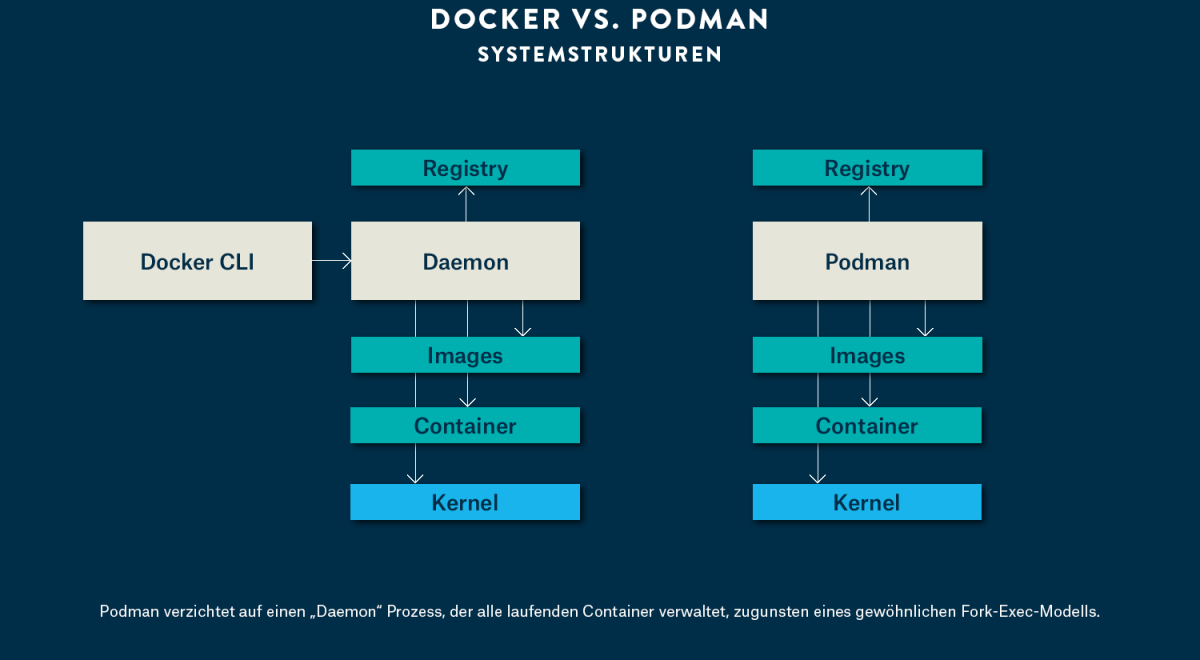
Podman’s core value proposition is simple: you can run containers without a daemon, and you can do it rootless by default. That sounds like implementation detail—until you look at what it means for security and operations.
In many Docker-based workflows, the daemon is a privileged point of control. When you run containers, you are indirectly asking that daemon to perform privileged operations on your behalf. Rootless operation flips the model: containers run with your user’s privileges, and the runtime is designed to work within those constraints.
A practical example: local dev without “sudo roulette”⌗
Imagine you’re developing a microservice that needs to write to a mounted directory and bind ports locally. With rootless runtimes, you’re less likely to reach for “just run it as root” when something goes sideways.
Try this mental checklist when you evaluate rootless support:
- Do you need elevated privileges for file access, or can you use user-owned mounts?
- Are ports you expose compatible with your user namespace mapping (e.g., unprivileged ports)?
- When you map volumes, what does the container process actually get permission to do?
Podman doesn’t remove all complexity, but it forces you to confront privilege boundaries earlier. That’s exactly what you want. Better to discover “this workload shouldn’t need root” on day one than after a production incident.
containerd: the runtime engine Kubernetes actually speaks⌗
If you’ve been building on Kubernetes for more than a minute, you already live in the world of containerd—whether you realized it or not. containerd is the runtime layer that executes container workloads. It’s the piece that sits “under” higher-level orchestration and starts the containers.
This matters because performance and security troubleshooting often comes down to runtime mechanics:
- How images are unpacked and stored
- How namespaces and cgroups are configured
- What happens when pulls fail, signatures don’t validate, or filesystem mounts behave differently than expected
Practical advice: learn the language of the runtime, not just the CLI⌗
When something breaks, you don’t want to guess at the boundary between “Kubernetes says it’s running” and “the container actually started correctly.” Knowing that containerd is the executor helps you frame investigations:
- Is the issue image-related (pull/build/artifact), or execution-related (runtime configuration)?
- Are you dealing with permissions, filesystem behavior, or networking?
- Do you see errors in runtime logs that align with pod lifecycle events?
Even if you never touch containerd directly, internalizing that Kubernetes talks to a runtime makes your debugging more precise.
BuildKit: stop thinking of image builds as one monolithic step⌗
Compose and “docker build” are easy mental models. The catch is that building images has become a sophisticated pipeline: caching, parallelization, cross-stage optimization, and reproducibility are all different problems than “run a Dockerfile.”
BuildKit is a builder designed to handle that complexity. In practice, the difference shows up when you care about:
- Fast rebuilds (especially in monorepos)
- Deterministic output (so deployments are traceable)
- Efficient multi-stage builds (so your runtime image isn’t bloated by build tooling)
Example: the monorepo trap⌗
If you build multiple services from a shared repo, naive Docker builds often invalidate cache too easily. One small change forces everything to rebuild, even if 90% of layers are unchanged.
With a BuildKit-style mindset, you start designing builds for cache stability:
- Split dependency installation steps from source compilation steps
- Use multi-stage builds so only the final artifacts ship
- Structure Dockerfile stages so changes only invalidate what truly depends on them
This isn’t just faster—it’s a reliability upgrade. Fewer unnecessary rebuilds means fewer opportunities to introduce transient failures and fewer changes to inspect when something regresses.
The ecosystem unbundled: why “containers” is now a stack you must understand⌗
The most important shift in 2023 is that the container ecosystem isn’t a single thing anymore. It’s a set of cooperating components:
- Image building (e.g., BuildKit)
- Image storage and distribution (registries and content-addressed layers)
- Runtime execution (e.g., containerd)
- Service orchestration/compose tooling (e.g., Compose, or Kubernetes for real clusters)
- Security and trust tooling (signing, scanning, policy enforcement)
When these were bundled tightly, teams could “set and forget.” Now you need to know what each layer does and where security controls live.
Security: stop assuming you get it “because you’re using containers”⌗
Security posture depends on where you enforce it:
- Do you verify image provenance/signatures before runtime?
- Do you scan the right artifacts—the final image you deploy, not just intermediates?
- Are runtime privileges minimized (rootless where appropriate)?
- Do you understand what the filesystem mounts allow inside the container?
The unbundling forces better hygiene. You can’t outsource security to a single vendor setting anymore. But you also gain flexibility: you can pick the components and policies that fit your risk profile.
Performance: measure the right bottleneck⌗
Performance issues often trace back to layer boundaries:
- Slow pulls? That’s registry/storage/network.
- Slow rebuilds? That’s build caching and Dockerfile structure.
- Slow startup? That’s runtime execution and filesystem/cgroup configuration.
- High resource usage? That’s app/container config plus how the runtime constrains it.
A stack-aware mindset turns “containers are slow” into a concrete investigation plan.
Docker Desktop as an on-ramp—and a curriculum for escaping abstraction⌗
Docker Desktop remains the easiest on-ramp. It’s a polished developer experience: it spins up what you need, abstracts away runtime details, and gets people shipping.
But if you stay at that abstraction level forever, you’ll eventually hit friction in production. And production is where the layers matter: rootless behavior, runtime logs, image build caching, and cluster execution semantics.
A simple learning path that pays off⌗
Here’s a practical approach that keeps your team productive while building real understanding:
- Use Docker Desktop for local iteration, but treat it as a convenience, not a reference architecture.
- Practice with Podman rootless for at least a few workflows. Learn what changes when you don’t have a privileged daemon.
- Become fluent in Kubernetes-runtime boundaries by learning what containerd is doing when a pod starts.
- Optimize a Dockerfile with BuildKit-style thinking, even if you still invoke it via higher-level tooling.
- Write down your security pipeline: where scanning happens, where signing is verified, and what policy blocks deployment.
This is how you turn “containers” from a button-click into an engineering discipline.
Conclusion: the future isn’t “Docker vs. not Docker”—it’s layered competence⌗
The container world in 2023 rewards people who can describe the stack accurately. Docker Compose was a great starting point, but it shouldn’t be your endpoint. Podman changes privilege assumptions with rootless execution. containerd anchors Kubernetes runtime behavior. BuildKit modernizes image building as a performance and reliability tool. And the unbundling of the ecosystem means you must understand the layers to secure and optimize your systems.
If you want to be a better infrastructure engineer, don’t fight the abstraction—learn what it hides. Then build with intention.